Congratulations on your approval! Here is how to get your profile and giving page live:
- Check your inbox and spam folder the MDM approval email.
- The approval email walks you through setting up your Missionary Account, which includes your public missionary profile page on modernday.org. You will also be instructed on how to set up your DonorGive account.
- Your DonorGive missionary portal includes your DonorGive link - a unique DonorGive URL that you will insert into your account setup on modernday.org. This link is needed to pair your modernday.org missionary account to DonorGIve.
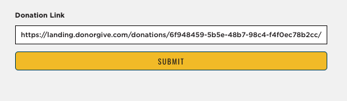
- The DonorGive link (shown above) is to be inserted in the Donation Link filed, which is housed inside your MDM missionary account. This step will be completed when setting up your MDM missionary account.
- Once set up, you may share your missionary profile page link (URL) with those that want to give. This is the link that takes them to your profile page.
|
Note: The single most common onboarding issue is missionaries not finding the approval email. It goes to spam occasionally. Search your spam folder for 'Modern Day Missions-Approval' or emails from a modernday.org address. If you still cannot find it, email info@modernday.org. |